Optimize your images without the upload
Squishify runs the same encoders behind squoosh.app — libavif, libwebp, MozJPEG, and Oxipng — as WebAssembly, right in your browser. No cloud API, no accounts, no upload tokens. Pro adds more ways to prep your assets on top.
$30/year · cancel anytime · trial needs just an email · See what’s in Pro
Your images never leave your browser
No cloud processing, no accounts, no upload quotas — everything runs locally as WebAssembly, so there’s nothing to upload and nothing for us to see.
True privacy
Every image is processed on your machine. We don’t have servers that could receive them — nothing to leak, log, or lose.
No accounts, no tokens
No sign-up, no API keys, no credit meter counting down. Open the tab and start optimizing.
Modern formats
Ship AVIF, WebP, JPEG, and PNG — dramatically smaller files at exactly the quality you choose.
Before / after preview
A live comparison loupe on every image — drag the divider and see exactly what a quality setting costs before you commit.
Batch workflow
Queue up to 25 images free, or 100 with Pro — tune one, then apply the format and quality to the whole batch in a click. Got more? Pro starts the next batch with the same settings, and rename numbering picks up where it left off.
Any host, any CMS
Optimize once, then drop the finished files in wherever you actually publish — WordPress, Shopify, a static site, anywhere.
See the whole batch, or one image at a time
Grid and Preview are two views of the same queue — switch between them whenever you like from the switch at the top of the app. Whatever you set applies to every image either way.
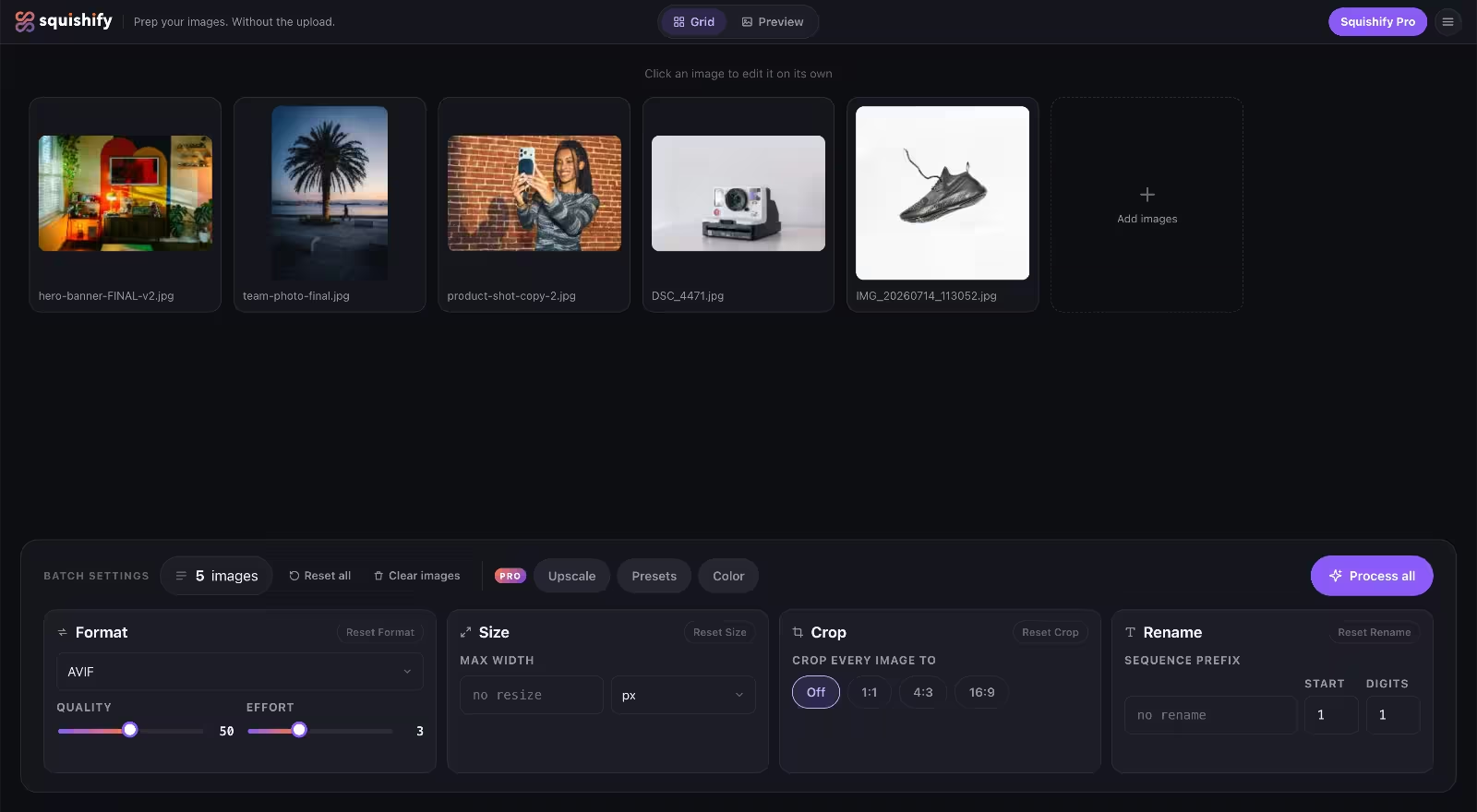
The whole batch at a glance
Every image you queued, side by side. Set the format, quality, a max width, a crop ratio and a rename sequence once, underneath, and they cover the whole queue at once. Click any thumbnail to open that image on its own.
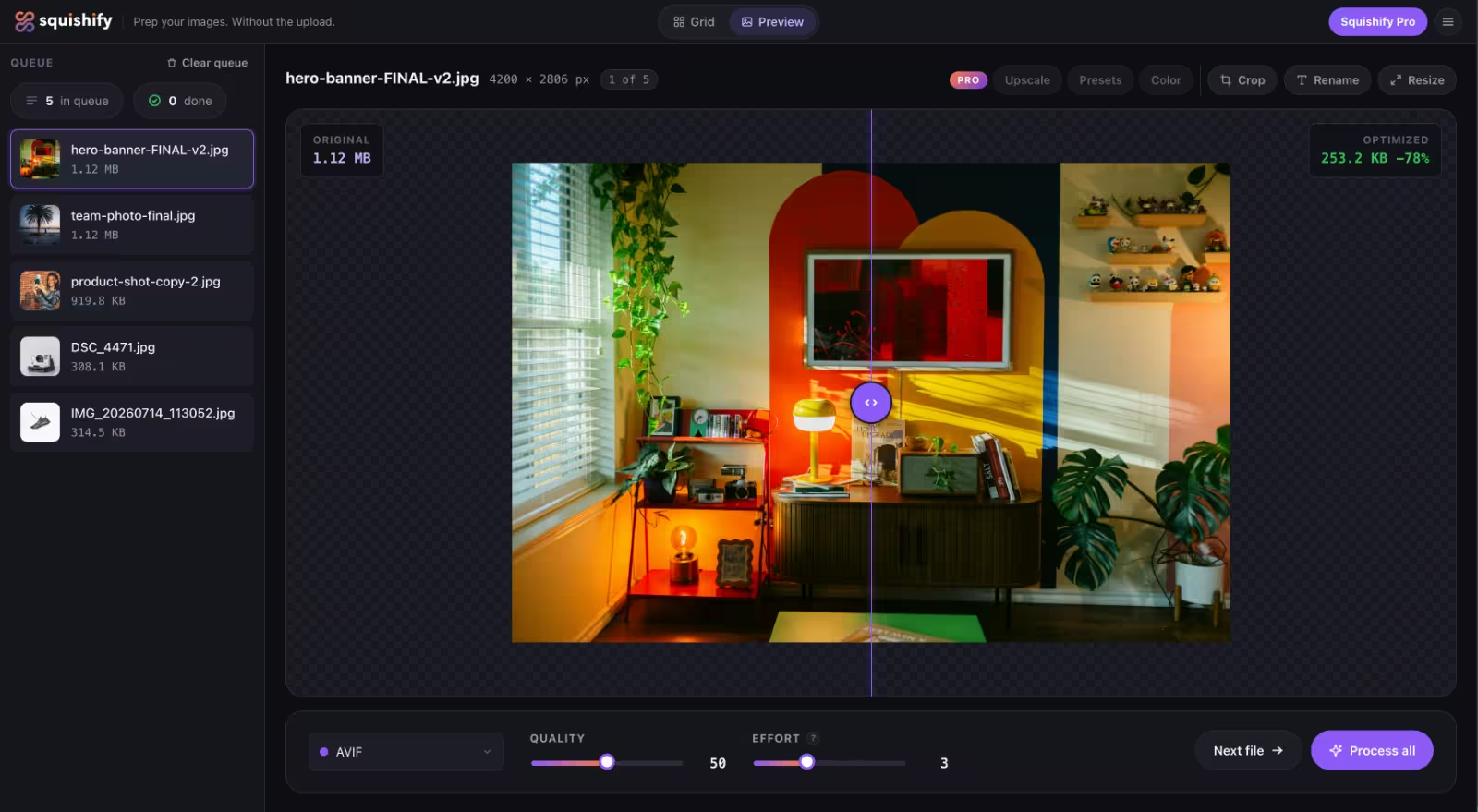
One image, up close
Work through the queue file by file. Drag the before/after loupe to see exactly what a quality setting costs, tune one image, then apply the same settings across the batch in a click.
Three steps, right in your browser
Open squishify.app and drop your images in — no install, no account.
;stroke-width:1.4px;}.cls-1,.cls-2,.cls-3,.cls-4,.cls-5{stroke-miterlimit:10;}.cls-1,.cls-3,.cls-4{fill:%231b1d2a;}.cls-2{fill:%2320212b;stroke:url(%23linear-gradient-4);}.cls-2,.cls-3,.cls-5{stroke-width:1.5px;}.cls-6{fill:%23fff;}.cls-7{fill:%23625faa;}.cls-3{stroke:url(%23linear-gradient-3);}.cls-4{stroke:url(%23linear-gradient-2);stroke-width:1.45px;}.cls-5{fill:%2332333d;stroke:url(%23linear-gradient-5);}%3c/style%3e%3clinearGradient%20id='linear-gradient'%20x1='25.94'%20y1='114.29'%20x2='113.67'%20y2='-4.58'%20gradientTransform='translate(-.86%20.56)'%20gradientUnits='userSpaceOnUse'%3e%3cstop%20offset='0'%20stop-color='%23f15f31'/%3e%3cstop%20offset='1'%20stop-color='%236a53a3'/%3e%3c/linearGradient%3e%3clinearGradient%20id='linear-gradient-2'%20x1='35.11'%20y1='127.69'%20x2='120.46'%20y2='2.54'%20gradientTransform='translate(.14%20-.35)'%20xlink:href='%23linear-gradient'/%3e%3clinearGradient%20id='linear-gradient-3'%20x1='50.18'%20y1='7.05'%20x2='126.64'%20y2='139.48'%20gradientTransform='matrix(1,0,0,1,0,0)'%20xlink:href='%23linear-gradient'/%3e%3clinearGradient%20id='linear-gradient-4'%20x1='16.25'%20y1='94.54'%20x2='160.16'%20y2='94.54'%20gradientUnits='userSpaceOnUse'%3e%3cstop%20offset='0'%20stop-color='%2398509f'/%3e%3cstop%20offset='1'%20stop-color='%236a53a3'/%3e%3c/linearGradient%3e%3clinearGradient%20id='linear-gradient-5'%20x1='41.28'%20y1='56.7'%20x2='62.93'%20y2='44.2'%20xlink:href='%23linear-gradient-4'/%3e%3c/defs%3e%3crect%20class='cls-1'%20x='4.6'%20y='6.41'%20width='128.71'%20height='98.01'%20rx='11.18'%20ry='11.18'%20transform='translate(-5.77%208.07)%20rotate(-6.43)'/%3e%3crect%20class='cls-4'%20x='11.23'%20y='13.97'%20width='133.42'%20height='101.59'%20rx='11.59'%20ry='11.59'%20transform='translate(-4.63%206.02)%20rotate(-4.29)'/%3e%3crect%20class='cls-3'%20x='19.32'%20y='20.66'%20width='138.19'%20height='105.22'%20rx='12'%20ry='12'/%3e%3cpath%20class='cls-2'%20d='M31.32,125.88h114.19c6.56,0,11.92-5.33,11.99-11.87-8.93-9.84-46.36-50.8-51.21-50.8-5.52,0-26.97,26.97-26.97,26.97,0,0-18.59-17.57-21.45-17.57s-19.21,16.96-19.21,16.96l-19.34,18.06v6.26c0,6.6,5.4,12,12,12Z'/%3e%3ccircle%20class='cls-5'%20cx='52.1'%20cy='50.45'%20r='11.75'/%3e%3ccircle%20class='cls-7'%20cx='146.62'%20cy='101.44'%20r='28.18'/%3e%3crect%20class='cls-6'%20x='145.56'%20y='91.33'%20width='3.74'%20height='20.23'/%3e%3crect%20class='cls-6'%20x='145.56'%20y='91.33'%20width='3.74'%20height='20.23'%20transform='translate(248.87%20-45.98)%20rotate(90)'/%3e%3c/svg%3e)
Queue your images
Drag & drop, click to browse, or paste from your clipboard — up to 25 per batch free, 100 with Pro.
;stroke-width:1.5px;}.cls-8{fill:%238986c1;}%3c/style%3e%3clinearGradient%20id='linear-gradient'%20x1='-10.94'%20y1='103.87'%20x2='119.95'%20y2='28.3'%20gradientUnits='userSpaceOnUse'%3e%3cstop%20offset='0'%20stop-color='%2398509f'/%3e%3cstop%20offset='1'%20stop-color='%236a53a3'/%3e%3c/linearGradient%3e%3c/defs%3e%3crect%20class='cls-6'%20x='.75'%20y='.75'%20width='107.52'%20height='130.67'%20rx='12'%20ry='12'/%3e%3crect%20class='cls-7'%20x='20.66'%20y='28.85'%20width='67.04'%20height='5.55'%20rx='2.78'%20ry='2.78'/%3e%3crect%20class='cls-7'%20x='20.66'%20y='63.36'%20width='67.04'%20height='5.55'%20rx='2.78'%20ry='2.78'/%3e%3crect%20class='cls-7'%20x='20.66'%20y='95.1'%20width='67.04'%20height='5.55'%20rx='2.78'%20ry='2.78'/%3e%3crect%20class='cls-8'%20x='28.59'%20y='88.75'%20width='11.9'%20height='18.25'%20rx='5.95'%20ry='5.95'/%3e%3crect%20class='cls-8'%20x='37.22'%20y='56.96'%20width='11.9'%20height='18.25'%20rx='5.95'%20ry='5.95'/%3e%3crect%20class='cls-8'%20x='25.32'%20y='22.5'%20width='11.9'%20height='18.25'%20rx='5.95'%20ry='5.95'/%3e%3crect%20class='cls-2'%20x='121.74'%20y='40.67'%20width='74.11'%20height='56.43'%20rx='6.44'%20ry='6.44'/%3e%3cpath%20class='cls-1'%20d='M128.17,97.1h61.24c3.52,0,6.39-2.86,6.43-6.37-4.79-5.28-24.86-27.25-27.47-27.25-2.96,0-14.46,14.46-14.46,14.46,0,0-9.97-9.42-11.51-9.42s-10.3,9.1-10.3,9.1l-10.37,9.69v3.36c0,3.54,2.9,6.44,6.44,6.44Z'/%3e%3ccircle%20class='cls-4'%20cx='139.32'%20cy='56.65'%20r='6.3'/%3e%3cline%20class='cls-3'%20x1='120.52'%20y1='35.64'%20x2='120.52'%20y2='39.11'/%3e%3cline%20class='cls-3'%20x1='158.79'%20y1='35.64'%20x2='158.79'%20y2='39.11'/%3e%3cline%20class='cls-3'%20x1='196.47'%20y1='35.64'%20x2='196.47'%20y2='39.11'/%3e%3cline%20class='cls-3'%20x1='186.4'%20y1='25.22'%20x2='180.29'%20y2='25.22'/%3e%3cline%20class='cls-3'%20x1='174.2'%20y1='25.22'%20x2='168.09'%20y2='25.22'/%3e%3cline%20class='cls-3'%20x1='149.17'%20y1='25.22'%20x2='143.06'%20y2='25.22'/%3e%3cline%20class='cls-3'%20x1='136.57'%20y1='25.22'%20x2='130.46'%20y2='25.22'/%3e%3cline%20class='cls-5'%20x1='124.4'%20y1='25.22'%20x2='120.52'%20y2='25.22'/%3e%3cline%20class='cls-5'%20x1='120.52'%20y1='29.09'%20x2='120.52'%20y2='23.72'/%3e%3cline%20class='cls-5'%20x1='196.93'%20y1='25.22'%20x2='193.05'%20y2='25.22'/%3e%3cline%20class='cls-5'%20x1='196.93'%20y1='29.09'%20x2='196.93'%20y2='23.72'/%3e%3cline%20class='cls-5'%20x1='155.2'%20y1='25.22'%20x2='162.41'%20y2='25.22'/%3e%3c/svg%3e)
Edit & optimize
Adjust format, quality, and size with a live before/after preview.
;stroke:%238a8996;stroke-width:1.5px;}.cls-1,.cls-2{stroke-miterlimit:10;}.cls-3{fill:%236461ab;}.cls-2{fill:%231b1d2c;stroke:%234a4f68;stroke-width:2px;}%3c/style%3e%3clinearGradient%20id='linear-gradient'%20x1='92.92'%20y1='97.64'%20x2='92.92'%20y2='147.19'%20gradientUnits='userSpaceOnUse'%3e%3cstop%20offset='0'%20stop-color='%231b1d2c'/%3e%3cstop%20offset='.66'%20stop-color='%231f1e25'/%3e%3cstop%20offset='1'%20stop-color='%23231f20'/%3e%3c/linearGradient%3e%3c/defs%3e%3cpath%20class='cls-2'%20d='M17.17,118.57v-22.18l18.43-19.33c2.47-2.59,5.88-4.05,9.46-4.05h96.59c3.83,0,7.46,1.68,9.95,4.59l17.07,20.04v20.93H17.17Z'/%3e%3cpath%20class='cls-1'%20d='M17.17,97.64v34.62c0,8.24,6.68,14.93,14.93,14.93h121.64c8.24,0,14.93-6.68,14.93-14.93v-34.62h-31.23c-4.09,0-7.92,2.05-10.19,5.45l-3.42,5.14c-2.27,3.41-6.09,5.45-10.19,5.45h-40.6c-4.16,0-8.04-2.11-10.29-5.61l-3.1-4.82c-2.25-3.5-6.13-5.61-10.29-5.61H17.17Z'/%3e%3crect%20class='cls-3'%20x='89.11'%20y='10.2'%20width='9.81'%20height='82'%20rx='4.9'%20ry='4.9'/%3e%3crect%20class='cls-3'%20x='104.21'%20y='47.89'%20width='9.81'%20height='52.55'%20rx='3.94'%20ry='3.94'%20transform='translate(84.4%20-55.44)%20rotate(45)'/%3e%3crect%20class='cls-3'%20x='73.6'%20y='47.89'%20width='9.81'%20height='52.55'%20rx='3.94'%20ry='3.94'%20transform='translate(-29.45%2077.24)%20rotate(-45)'/%3e%3cpath%20class='cls-3'%20d='M14.62,28.41l2.8,7.57c.73,1.96,2.27,3.51,4.24,4.24l7.57,2.8-7.57,2.8c-1.96.73-3.51,2.27-4.24,4.24l-2.8,7.57-2.8-7.57c-.73-1.96-2.27-3.51-4.24-4.24l-7.57-2.8,7.57-2.8c1.96-.73,3.51-2.27,4.24-4.24l2.8-7.57Z'/%3e%3cpath%20class='cls-3'%20d='M168.67,0l2.8,7.57c.73,1.96,2.27,3.51,4.24,4.24l7.57,2.8-7.57,2.8c-1.96.73-3.51,2.27-4.24,4.24l-2.8,7.57-2.8-7.57c-.73-1.96-2.27-3.51-4.24-4.24l-7.57-2.8,7.57-2.8c1.96-.73,3.51-2.27,4.24-4.24l2.8-7.57Z'/%3e%3cpath%20class='cls-3'%20d='M156.38,20.72l1.18,3.2c.31.83.96,1.48,1.79,1.79l3.2,1.18-3.2,1.18c-.83.31-1.48.96-1.79,1.79l-1.18,3.2-1.18-3.2c-.31-.83-.96-1.48-1.79-1.79l-3.2-1.18,3.2-1.18c.83-.31,1.48-.96,1.79-1.79l1.18-3.2Z'/%3e%3cpath%20class='cls-3'%20d='M26.6,24.19l1.18,3.2c.31.83.96,1.48,1.79,1.79l3.2,1.18-3.2,1.18c-.83.31-1.48.96-1.79,1.79l-1.18,3.2-1.18-3.2c-.31-.83-.96-1.48-1.79-1.79l-3.2-1.18,3.2-1.18c.83-.31,1.48-.96,1.79-1.79l1.18-3.2Z'/%3e%3c/svg%3e)
Download & go!
Save the finished files straight to your computer.
What people are saying
“Overall this concept and execution of Squishify is phenomenal work. This is truly a great idea executed perfectly.”
… “Accessibility is exceptional with keyboard access and tab controls working for all interfaces.”
“I have used TinyPNG for more than 8 years, but Squishify just replaced it in my workflow. It’s literally TinyPNG on steroids. Being able to batch compress, convert, and resize images completely locally in the browser is brilliant. Great job”
“I run a bunch of product shots through this before they go anywhere — drag in a folder, pick a format, and it spits out a smaller version without me installing anything or uploading to some random site. The before/after preview is what sold me, I could actually see what I was trading off.”