Prep images before they touch your WordPress site
Every other image plugin optimizes after upload — the heavy originals still travel to your server and still fill your disk. Squishify flips the order: compress, convert, and resize in your browser, then upload only the finished files to your Media Library.
Free · WordPress 6.5+ · Now on the WordPress.org plugin directory · See what’s in Pro
Optimize first. Upload second.
Squishify runs the same encoders behind squoosh.app — libavif, libwebp, MozJPEG, and Oxipng — as WebAssembly, right in your browser, inside wp-admin.
True privacy
Processing happens on your machine. Images never touch a third-party service — the only transfer is the final upload to your own site.
Save server space
Full-size originals never reach your server, and uploads stay under WordPress’s own 2560px limit — so WP never stores a “-scaled” duplicate either.
Faster page loads
Ship modern AVIF and WebP at exactly the size your pages need — dramatically smaller files, dramatically better Core Web Vitals.
Batch workflow
Queue up to 50 images free, or 100 with Pro — tune one, then apply the format and quality to the whole batch in a click. Got more? Pro starts the next batch with the same settings, and rename numbering picks up where it left off.
Before / after preview
A live comparison loupe on every image — drag the divider and see exactly what a quality setting costs before you commit.
No API keys, no quotas
No usage costs, no monthly credit meter — your browser does the work, so optimizing 5 images costs the same as 5,000.
See the whole batch, or one image at a time
Grid and Preview are two views of the same queue — switch between them whenever you like from the switch at the top of the editor. Whatever you set applies to every image either way.
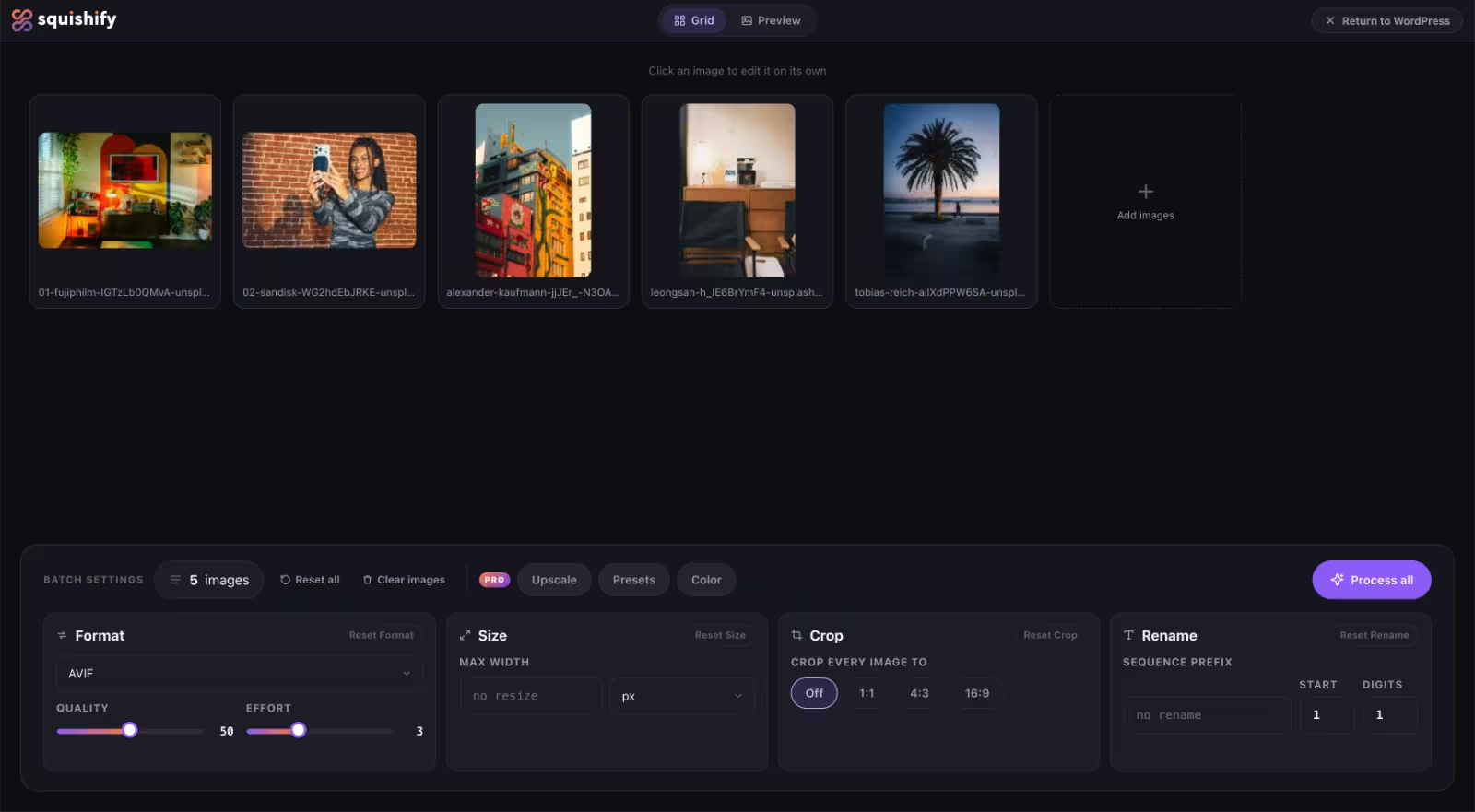
The whole batch at a glance
Every image you queued, side by side. Set the format, quality, a max width, a crop ratio and a rename sequence once, underneath, and they cover the whole queue at once. Click any thumbnail to open that image on its own.
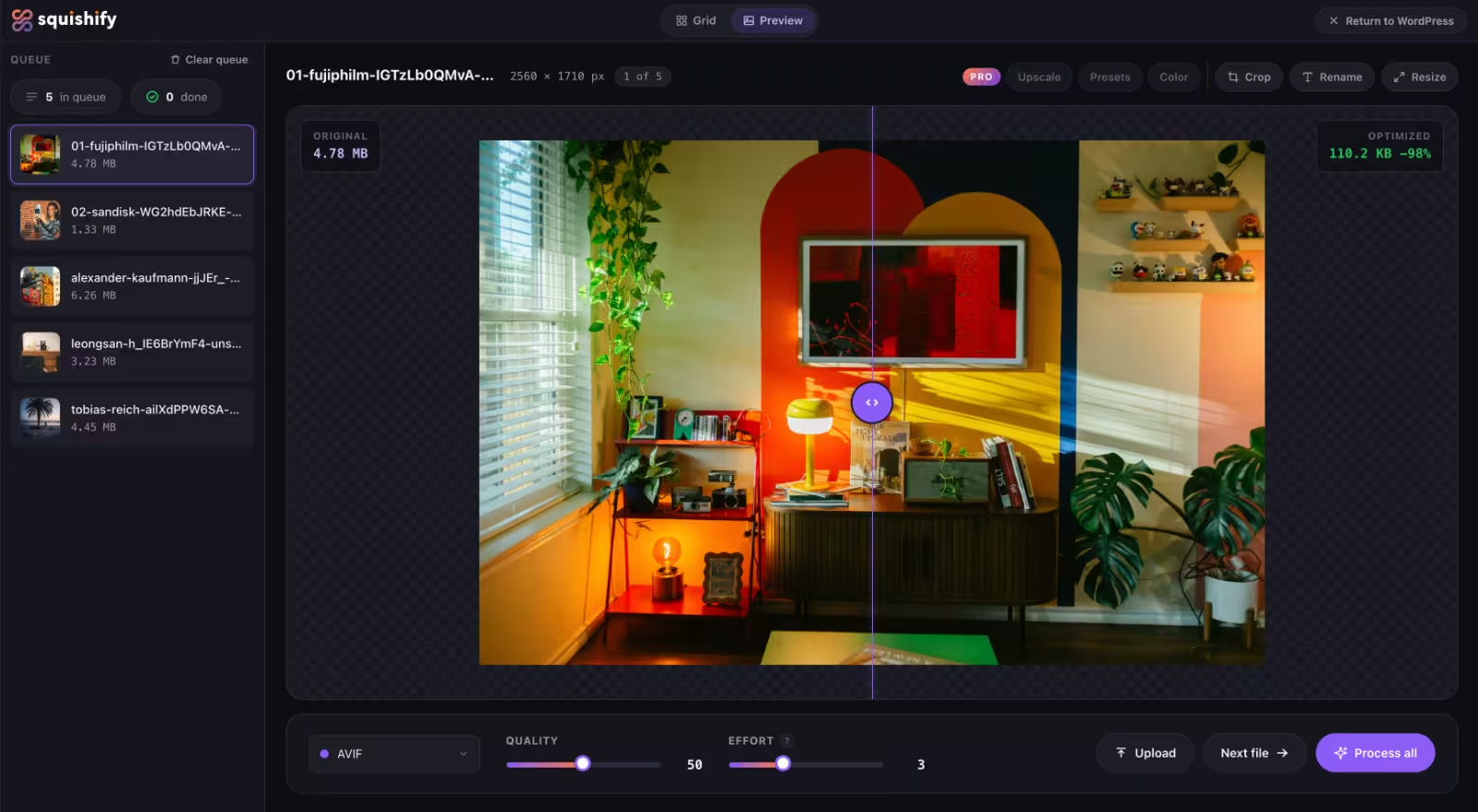
One image, up close
Work through the queue file by file. Drag the before/after loupe to see exactly what a quality setting costs, tune one image, then apply the same settings across the batch in a click.
Three steps, right inside wp-admin
Click the Squishify button in your Media Library and a full-screen editor opens over WordPress.
;stroke-width:1.4px;}.cls-1,.cls-2,.cls-3,.cls-4,.cls-5{stroke-miterlimit:10;}.cls-1,.cls-3,.cls-4{fill:%231b1d2a;}.cls-2{fill:%2320212b;stroke:url(%23linear-gradient-4);}.cls-2,.cls-3,.cls-5{stroke-width:1.5px;}.cls-6{fill:%23fff;}.cls-7{fill:%23625faa;}.cls-3{stroke:url(%23linear-gradient-3);}.cls-4{stroke:url(%23linear-gradient-2);stroke-width:1.45px;}.cls-5{fill:%2332333d;stroke:url(%23linear-gradient-5);}%3c/style%3e%3clinearGradient%20id='linear-gradient'%20x1='25.94'%20y1='114.29'%20x2='113.67'%20y2='-4.58'%20gradientTransform='translate(-.86%20.56)'%20gradientUnits='userSpaceOnUse'%3e%3cstop%20offset='0'%20stop-color='%23f15f31'/%3e%3cstop%20offset='1'%20stop-color='%236a53a3'/%3e%3c/linearGradient%3e%3clinearGradient%20id='linear-gradient-2'%20x1='35.11'%20y1='127.69'%20x2='120.46'%20y2='2.54'%20gradientTransform='translate(.14%20-.35)'%20xlink:href='%23linear-gradient'/%3e%3clinearGradient%20id='linear-gradient-3'%20x1='50.18'%20y1='7.05'%20x2='126.64'%20y2='139.48'%20gradientTransform='matrix(1,0,0,1,0,0)'%20xlink:href='%23linear-gradient'/%3e%3clinearGradient%20id='linear-gradient-4'%20x1='16.25'%20y1='94.54'%20x2='160.16'%20y2='94.54'%20gradientUnits='userSpaceOnUse'%3e%3cstop%20offset='0'%20stop-color='%2398509f'/%3e%3cstop%20offset='1'%20stop-color='%236a53a3'/%3e%3c/linearGradient%3e%3clinearGradient%20id='linear-gradient-5'%20x1='41.28'%20y1='56.7'%20x2='62.93'%20y2='44.2'%20xlink:href='%23linear-gradient-4'/%3e%3c/defs%3e%3crect%20class='cls-1'%20x='4.6'%20y='6.41'%20width='128.71'%20height='98.01'%20rx='11.18'%20ry='11.18'%20transform='translate(-5.77%208.07)%20rotate(-6.43)'/%3e%3crect%20class='cls-4'%20x='11.23'%20y='13.97'%20width='133.42'%20height='101.59'%20rx='11.59'%20ry='11.59'%20transform='translate(-4.63%206.02)%20rotate(-4.29)'/%3e%3crect%20class='cls-3'%20x='19.32'%20y='20.66'%20width='138.19'%20height='105.22'%20rx='12'%20ry='12'/%3e%3cpath%20class='cls-2'%20d='M31.32,125.88h114.19c6.56,0,11.92-5.33,11.99-11.87-8.93-9.84-46.36-50.8-51.21-50.8-5.52,0-26.97,26.97-26.97,26.97,0,0-18.59-17.57-21.45-17.57s-19.21,16.96-19.21,16.96l-19.34,18.06v6.26c0,6.6,5.4,12,12,12Z'/%3e%3ccircle%20class='cls-5'%20cx='52.1'%20cy='50.45'%20r='11.75'/%3e%3ccircle%20class='cls-7'%20cx='146.62'%20cy='101.44'%20r='28.18'/%3e%3crect%20class='cls-6'%20x='145.56'%20y='91.33'%20width='3.74'%20height='20.23'/%3e%3crect%20class='cls-6'%20x='145.56'%20y='91.33'%20width='3.74'%20height='20.23'%20transform='translate(248.87%20-45.98)%20rotate(90)'/%3e%3c/svg%3e)
Queue your images
Drag & drop, click to browse, or paste from your clipboard — up to 50 per batch, 100 with Pro.
;stroke-width:1.5px;}.cls-8{fill:%238986c1;}%3c/style%3e%3clinearGradient%20id='linear-gradient'%20x1='-10.94'%20y1='103.87'%20x2='119.95'%20y2='28.3'%20gradientUnits='userSpaceOnUse'%3e%3cstop%20offset='0'%20stop-color='%2398509f'/%3e%3cstop%20offset='1'%20stop-color='%236a53a3'/%3e%3c/linearGradient%3e%3c/defs%3e%3crect%20class='cls-6'%20x='.75'%20y='.75'%20width='107.52'%20height='130.67'%20rx='12'%20ry='12'/%3e%3crect%20class='cls-7'%20x='20.66'%20y='28.85'%20width='67.04'%20height='5.55'%20rx='2.78'%20ry='2.78'/%3e%3crect%20class='cls-7'%20x='20.66'%20y='63.36'%20width='67.04'%20height='5.55'%20rx='2.78'%20ry='2.78'/%3e%3crect%20class='cls-7'%20x='20.66'%20y='95.1'%20width='67.04'%20height='5.55'%20rx='2.78'%20ry='2.78'/%3e%3crect%20class='cls-8'%20x='28.59'%20y='88.75'%20width='11.9'%20height='18.25'%20rx='5.95'%20ry='5.95'/%3e%3crect%20class='cls-8'%20x='37.22'%20y='56.96'%20width='11.9'%20height='18.25'%20rx='5.95'%20ry='5.95'/%3e%3crect%20class='cls-8'%20x='25.32'%20y='22.5'%20width='11.9'%20height='18.25'%20rx='5.95'%20ry='5.95'/%3e%3crect%20class='cls-2'%20x='121.74'%20y='40.67'%20width='74.11'%20height='56.43'%20rx='6.44'%20ry='6.44'/%3e%3cpath%20class='cls-1'%20d='M128.17,97.1h61.24c3.52,0,6.39-2.86,6.43-6.37-4.79-5.28-24.86-27.25-27.47-27.25-2.96,0-14.46,14.46-14.46,14.46,0,0-9.97-9.42-11.51-9.42s-10.3,9.1-10.3,9.1l-10.37,9.69v3.36c0,3.54,2.9,6.44,6.44,6.44Z'/%3e%3ccircle%20class='cls-4'%20cx='139.32'%20cy='56.65'%20r='6.3'/%3e%3cline%20class='cls-3'%20x1='120.52'%20y1='35.64'%20x2='120.52'%20y2='39.11'/%3e%3cline%20class='cls-3'%20x1='158.79'%20y1='35.64'%20x2='158.79'%20y2='39.11'/%3e%3cline%20class='cls-3'%20x1='196.47'%20y1='35.64'%20x2='196.47'%20y2='39.11'/%3e%3cline%20class='cls-3'%20x1='186.4'%20y1='25.22'%20x2='180.29'%20y2='25.22'/%3e%3cline%20class='cls-3'%20x1='174.2'%20y1='25.22'%20x2='168.09'%20y2='25.22'/%3e%3cline%20class='cls-3'%20x1='149.17'%20y1='25.22'%20x2='143.06'%20y2='25.22'/%3e%3cline%20class='cls-3'%20x1='136.57'%20y1='25.22'%20x2='130.46'%20y2='25.22'/%3e%3cline%20class='cls-5'%20x1='124.4'%20y1='25.22'%20x2='120.52'%20y2='25.22'/%3e%3cline%20class='cls-5'%20x1='120.52'%20y1='29.09'%20x2='120.52'%20y2='23.72'/%3e%3cline%20class='cls-5'%20x1='196.93'%20y1='25.22'%20x2='193.05'%20y2='25.22'/%3e%3cline%20class='cls-5'%20x1='196.93'%20y1='29.09'%20x2='196.93'%20y2='23.72'/%3e%3cline%20class='cls-5'%20x1='155.2'%20y1='25.22'%20x2='162.41'%20y2='25.22'/%3e%3c/svg%3e)
Edit & optimize
Adjust format, quality, and size with a live before/after preview.
;stroke:%238a8996;stroke-width:1.5px;}.cls-1,.cls-2{stroke-miterlimit:10;}.cls-3{fill:%236461ab;}.cls-2{fill:%231b1d2c;stroke:%234a4f68;stroke-width:2px;}%3c/style%3e%3clinearGradient%20id='linear-gradient'%20x1='92.92'%20y1='97.64'%20x2='92.92'%20y2='147.19'%20gradientUnits='userSpaceOnUse'%3e%3cstop%20offset='0'%20stop-color='%231b1d2c'/%3e%3cstop%20offset='.66'%20stop-color='%231f1e25'/%3e%3cstop%20offset='1'%20stop-color='%23231f20'/%3e%3c/linearGradient%3e%3c/defs%3e%3cpath%20class='cls-2'%20d='M17.17,118.57v-22.18l18.43-19.33c2.47-2.59,5.88-4.05,9.46-4.05h96.59c3.83,0,7.46,1.68,9.95,4.59l17.07,20.04v20.93H17.17Z'/%3e%3cpath%20class='cls-1'%20d='M17.17,97.64v34.62c0,8.24,6.68,14.93,14.93,14.93h121.64c8.24,0,14.93-6.68,14.93-14.93v-34.62h-31.23c-4.09,0-7.92,2.05-10.19,5.45l-3.42,5.14c-2.27,3.41-6.09,5.45-10.19,5.45h-40.6c-4.16,0-8.04-2.11-10.29-5.61l-3.1-4.82c-2.25-3.5-6.13-5.61-10.29-5.61H17.17Z'/%3e%3crect%20class='cls-3'%20x='89.11'%20y='10.2'%20width='9.81'%20height='82'%20rx='4.9'%20ry='4.9'/%3e%3crect%20class='cls-3'%20x='104.21'%20y='47.89'%20width='9.81'%20height='52.55'%20rx='3.94'%20ry='3.94'%20transform='translate(84.4%20-55.44)%20rotate(45)'/%3e%3crect%20class='cls-3'%20x='73.6'%20y='47.89'%20width='9.81'%20height='52.55'%20rx='3.94'%20ry='3.94'%20transform='translate(-29.45%2077.24)%20rotate(-45)'/%3e%3cpath%20class='cls-3'%20d='M14.62,28.41l2.8,7.57c.73,1.96,2.27,3.51,4.24,4.24l7.57,2.8-7.57,2.8c-1.96.73-3.51,2.27-4.24,4.24l-2.8,7.57-2.8-7.57c-.73-1.96-2.27-3.51-4.24-4.24l-7.57-2.8,7.57-2.8c1.96-.73,3.51-2.27,4.24-4.24l2.8-7.57Z'/%3e%3cpath%20class='cls-3'%20d='M168.67,0l2.8,7.57c.73,1.96,2.27,3.51,4.24,4.24l7.57,2.8-7.57,2.8c-1.96.73-3.51,2.27-4.24,4.24l-2.8,7.57-2.8-7.57c-.73-1.96-2.27-3.51-4.24-4.24l-7.57-2.8,7.57-2.8c1.96-.73,3.51-2.27,4.24-4.24l2.8-7.57Z'/%3e%3cpath%20class='cls-3'%20d='M156.38,20.72l1.18,3.2c.31.83.96,1.48,1.79,1.79l3.2,1.18-3.2,1.18c-.83.31-1.48.96-1.79,1.79l-1.18,3.2-1.18-3.2c-.31-.83-.96-1.48-1.79-1.79l-3.2-1.18,3.2-1.18c.83-.31,1.48-.96,1.79-1.79l1.18-3.2Z'/%3e%3cpath%20class='cls-3'%20d='M26.6,24.19l1.18,3.2c.31.83.96,1.48,1.79,1.79l3.2,1.18-3.2,1.18c-.83.31-1.48.96-1.79,1.79l-1.18,3.2-1.18-3.2c-.31-.83-.96-1.48-1.79-1.79l-3.2-1.18,3.2-1.18c.83-.31,1.48-.96,1.79-1.79l1.18-3.2Z'/%3e%3c/svg%3e)
Upload & go!
Send the finished files straight to your Media Library.
Or never open it at all
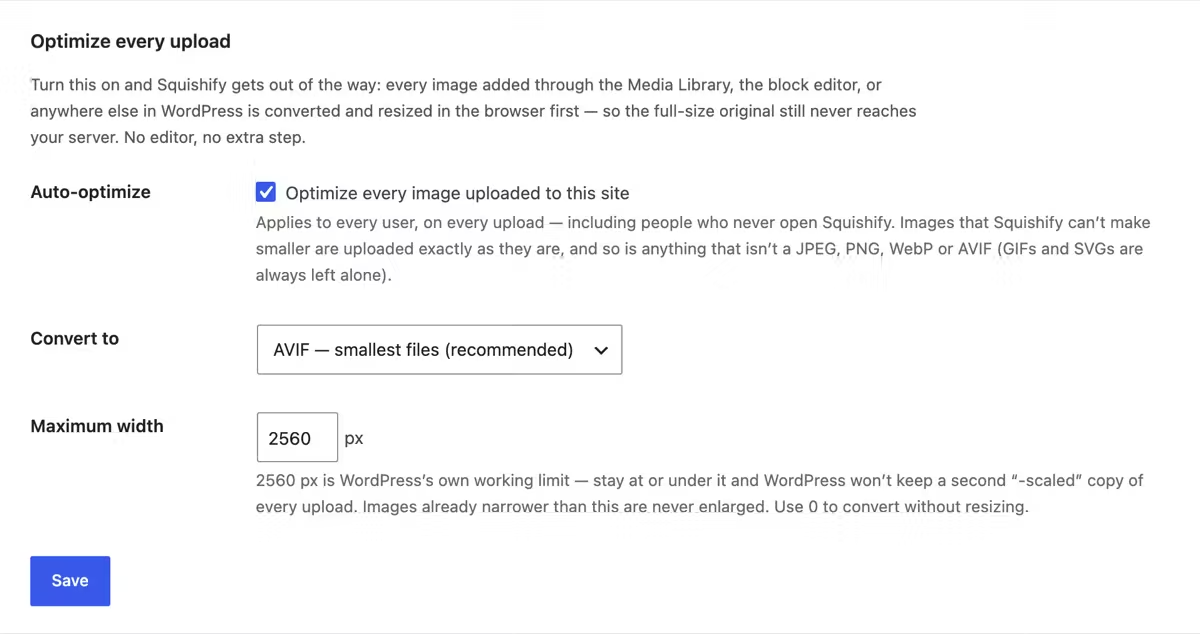
Switch on auto-optimize and every image added to your site — the Media Library, the block editor, anywhere WordPress takes an upload — is converted and resized in your browser on the way out.
The only optimizer where the zero-effort path still never uploads your original
Every image plugin optimizes what you upload. They do it after the file reaches your server, because that is the only place they can reach it. Squishify does it before the bytes leave the browser — and with auto-optimize on, that stays true even for the people on your site who have never heard of Squishify.
- Two settings. An output format and a maximum width. That is the whole thing.
- It leaves alone what it can’t improve. An image Squishify can’t make smaller uploads exactly as it is, and GIFs and SVGs are never touched.
- Free, in both plugins. Nothing here is held back for Pro.